

Modern WordPress sites often load far more JavaScript and CSS than they actually need on each page. This leads to slower load times, higher server usage, and unnecessary complexity. Custom Asset Blocker solves this problem by giving you precise control over where specific assets are allowed to load.
Usage Scenarios – Custom Asset Blocker
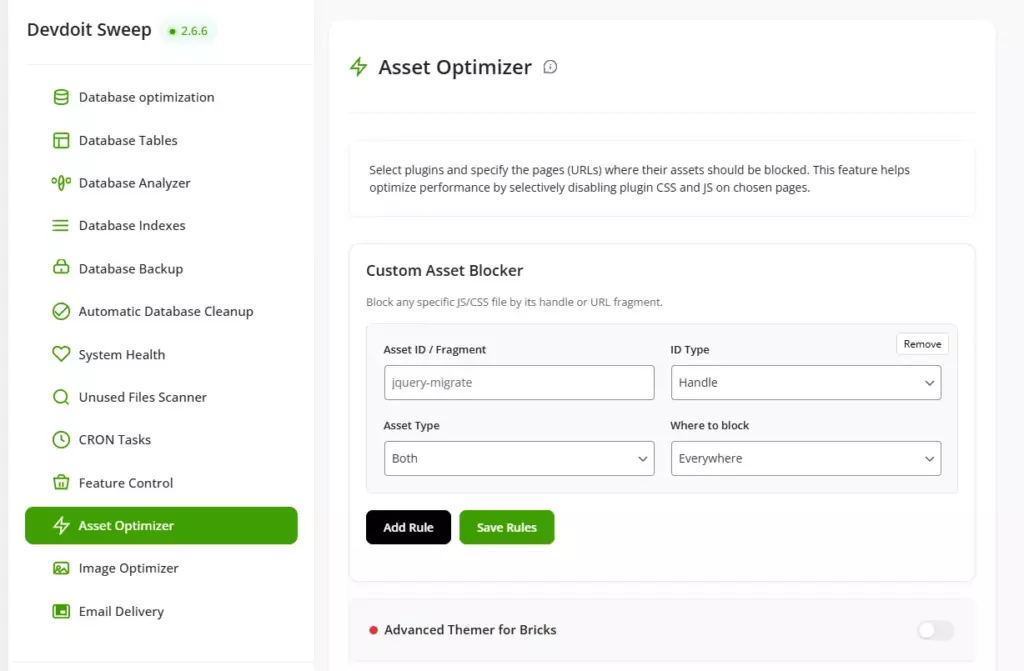
Limiting a Form Plugin to a Single Page
If a contact form plugin loads its JavaScript and CSS files globally, you can block them on all subpages except the contact page, preserving full form functionality only where needed.
Blocking WooCommerce Cart Scripts Outside the Checkout Process
Scripts responsible for the cart, AJAX, and user sessions can be loaded on every page. Custom Asset Blocker allows you to disable them on news and blog pages, leaving them active only on store pages.
Disabling Globally Loaded Google Maps
If a theme or plugin loads Google Maps on all subpages, but the map appears only on the contact page, you can block the map scripts on other URLs.
Blocking Heavy Sliders on Selected Subpages
Large slider libraries are often loaded globally, even if the slider appears only on the home page. You can block their resources on other subpages, eliminating unnecessary queries.
Removing unnecessary scripts from the checkout page
On checkout pages, you can block all scripts not directly related to payment, such as chat widgets, animations, or social feeds, to simplify the checkout process.
Blocking popup scripts on content pages
If the popup system is only needed on sales landing pages, you can block its CSS and JS files on blog and information pages.
Disabling visual editors on the frontend
Some page editors load additional scripts on the frontend even for logged-in users. Custom Asset Blocker allows you to block these resources where they are not used.
Resolving JavaScript conflicts locally
If a specific JS file is causing errors on only one subpage, you can block it only on that URL, without deactivating the entire plugin sitewide.
Optimizing landing pages for advertising campaigns
On campaign pages, you can block all resources not directly related to conversions, leaving only the necessary form or payment scripts.
Reducing the number of HTTP requests on selected website sections
By blocking unused CSS and JS files on specific groups of subpages, you can significantly reduce the number of HTTP requests and improve performance test results without modifying the source code.
Summary:
By selectively disabling unused CSS and JavaScript files, you can significantly improve performance without breaking functionality. Custom Asset Blocker makes it possible to optimize individual pages, fix script conflicts, and streamline critical user flows like checkout or landing pages. The result is a faster, cleaner, and more predictable website that loads only what is truly required.